
Create / Audio
Create
Audio
Voiceovers, explainers and two-host podcasts in natural voices.
Firelent turns a short description into finished spoken audio: a voiceover for your website, an explainer, a guided meditation, a welcome message — or a podcast-style conversation between two hosts. Firelent writes the script, casts the voices and records it.
How it works#
Open Audio
On your dashboard, click Create and choose Audio — or ask for audio in the chat of any website project.
Describe what you need
Say what it's about, who it's for, how long it should be and how it should sound.
Firelent writes and records it
First the script, then the recording. A short piece is usually ready within a minute or two.
Listen and download
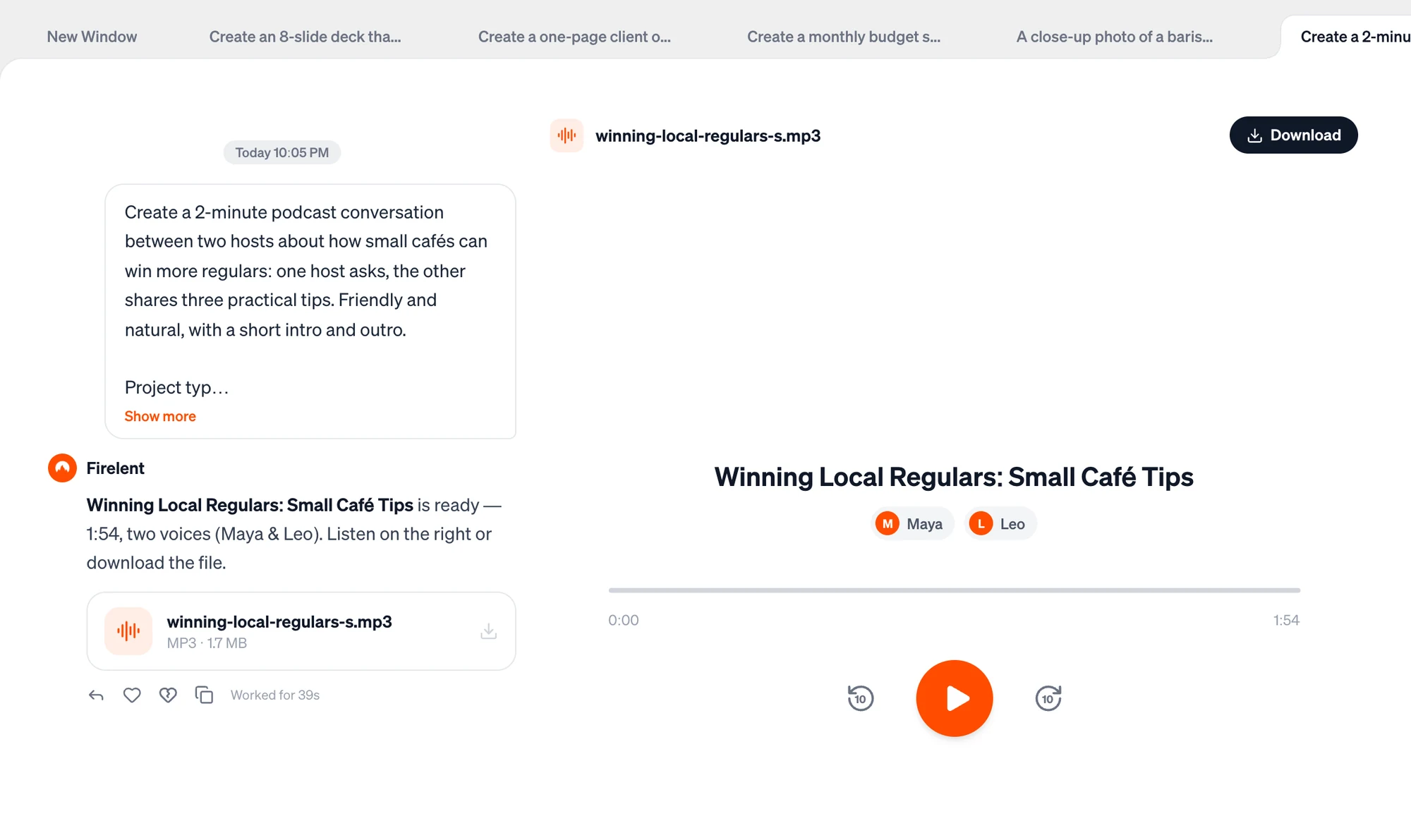
Play it in the player next to the chat, or click the file in the chat to download it.
What you can make#
| Voices | Good for | |
|---|---|---|
| Narration | One | Voiceovers, explainers, product intros, stories, meditations, welcome messages |
| Conversation | Two | Podcast episodes, interviews, Q&A, debates |
Firelent picks the voices to match your description — “a calm, warm narrator”, “an energetic host and a thoughtful guest” — and the script follows the language you write in. Audio is speech only: music, sound effects and background soundscapes aren't possible yet. If you ask for them, Firelent records the voice part and tells you.
Length and cost#
- Say how long. Without a length, you get about two to three minutes. The maximum is 15 minutes.
- Firelent's voices speak about 170 words per minute, so a one-minute voiceover is roughly 170 words.
- 1 credit per started minute, at least 3. A five-minute episode costs 5 credits. You're only charged once the script is written, and you get your credits back if the recording fails.
Write a prompt that sounds good#
Create a 2-minute podcast conversation between two hosts about how small cafés can win more regulars: one host asks, the other shares three practical tips. Friendly and natural, with a short intro and outro.
- Give it a shape. For a podcast: a hook, the hosts, two or three segments, a short recap and a goodbye.
- Say how it should sound: calm, upbeat, serious, playful — and the pace, like “slow and relaxed” for a meditation.
- Ask for pauses where they help: “a short pause after each tip”. Firelent adds performance cues like pauses, laughs, warmth or a whisper where you ask for them.
- Give it the facts. Firelent can't look things up online or read files, so put names, dates and details in your message.
- Have your own text read: paste it and say “read it exactly as written”.
Write for the ear#
If you write the text yourself, write it to be heard, not read:
- Short sentences, one idea each — about 20 words or fewer.
- Round numbers: “over four thousand” is easier to follow than “4,180”.
- Signpost: “First…”, “The second tip…”, “To sum up…”.
- Spell out tricky names the way they're said: “Firelent — FIRE-lent”.
- Write numbers, dates and prices as they're spoken when it matters: “the third of May”, “twelve euros fifty”.
The player#
The player shows the title and the speakers, and lets you scrub through the recording.
| Key | What it does |
|---|---|
| Space or K | Play and pause |
| J / L | Back / forward 10 seconds |
| ← / → | Back / forward 5 seconds |
Change it#
Ask for changes in the same chat — “make it slower”, “cut it to one minute”, “make the second host more sceptical”. Firelent writes and records a new version as a new file, at the usual price. It's written from your request and a summary of the previous version, so repeat anything that should stay the same. Earlier versions stay in the chat and in your Library.
You can't fix a single sentence on its own yet — each change records the whole piece again.
Use your audio#
- Download it from the chat or the player, or later from Library with the Audio filter. You get a standard audio file (MP3 or WAV) that plays everywhere.
- For a video: drop it into your video editor as the voiceover — see Videos.
- For a podcast: add your intro music and publish it with your podcast host.
- Tell people it's AI. If listeners could mistake the voices for real people, say that they're generated.
FAQ#
Can I pick a specific voice?#
Not by name. Describe the voice you want — age, energy, tone — and Firelent casts it.
Can I see the script?#
Not yet. If you need the text too, ask for a document with the same content.
Can I have more than two speakers?#
Not yet — one narrator or two speakers.