Create / Images
Create
Images
Create an image from a description, then refine it just by asking.
Describe a picture and Firelent creates it: product shots, illustrations, posters, social posts, mood images for your website. Then refine it in plain words — “warmer”, “closer”, “less busy” — until it's right.
How it works#
Open Image
On your dashboard, click Create and choose Image. You can also ask for an image in the chat of any website project.
Describe it
Start from one of the ideas or write your own description.
Get your image
It appears in the chat after a few seconds. Click it to see it full size, with Download and Info — the prompt it was made from.
Refine it
Reply with what to change. Firelent edits the image you have instead of starting over.
Each image — and each change — costs 3 credits. If something goes wrong, you get them back automatically.
Write a great image prompt#
Describe the picture in full sentences, roughly in this order:
| Example | |
|---|---|
| Subject | A barista pouring latte art |
| Setting | in a small café with a big window |
| Light | warm morning sun, soft shadows |
| Camera or style | close-up photo, shallow depth of field — or “flat illustration”, “watercolour”, “3D render” |
| Colour and mood | natural colours, calm, cosy |
| Shape | wide landscape, tall portrait or square |
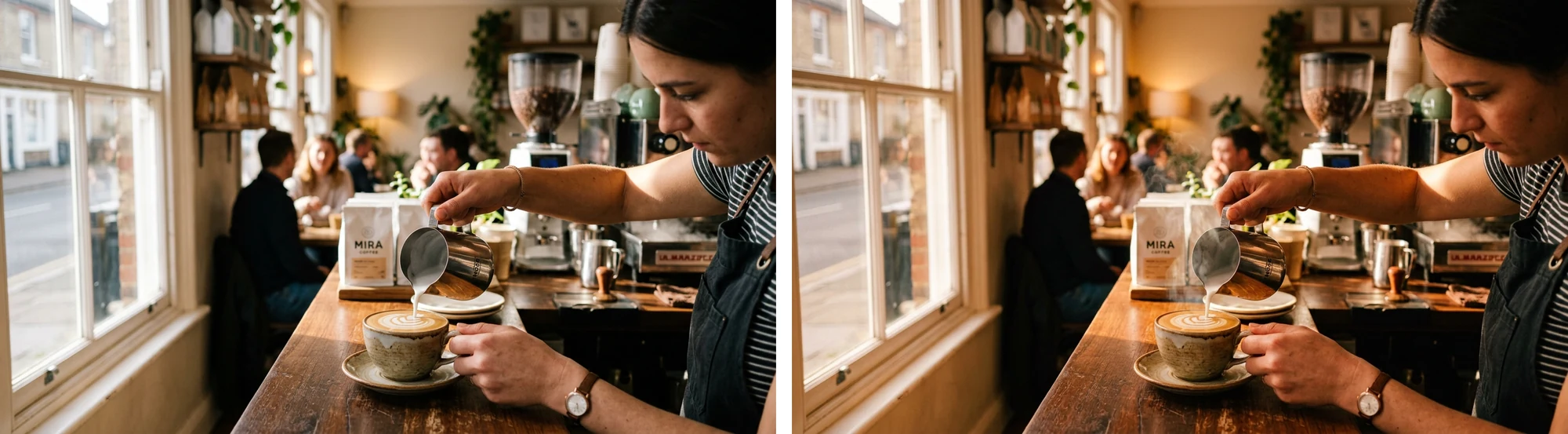
A close-up photo of a barista pouring latte art in a sunlit café, warm morning light through the window, shallow depth of field, natural colours, wide landscape format.
Rules of thumb#
- Say what you want, not what you don't. “An empty street at dawn” works better than “a street with no people”.
- One main subject. Pack in five ideas and some get dropped or blended together.
- Use photography words for photos: close-up, wide shot, from above, golden hour, soft light, shallow depth of field.
- Name the medium for illustrations: line drawing, flat vector, watercolour, paper cut-out, clay, 3D render.
- Say what it's for. “A banner for a bakery website” gives Firelent useful context.
Shape and size#
There's no size setting — describe the shape you need in your prompt. In the example above, “wide landscape format” came back as a 16:9 image, 1376 × 768 pixels.
| For | Ask for |
|---|---|
| A website banner or slide | Wide landscape (16:9) |
| An Instagram post | Portrait (4:5) or square |
| A story, reel or phone wallpaper | Tall portrait (9:16) |
| A profile picture or icon | Square |
Images are made for screens. For print, you need about 300 pixels per inch: an image 1,376 pixels wide prints sharply at roughly 11 to 12 cm wide.
Text in images#
Short text — a word or a short headline — can work. Put the exact words in quotes, keep them short and check the spelling. For anything longer, like a menu or a flyer full of details, create the image without text and add the words in your design tool or on your website.
Refine by asking#
Every follow-up in the same chat edits your newest image:
- Change one thing at a time. “Make it warmer” first, then “move the cup to the left”.
- Say what to keep. “Keep the barista and the window — only change the light.”
- Be clear about what matters. Small requests can come out subtle, like the steam above. If it's important, say so: “clearly visible steam”.
- Start fresh for something new. To make a different image, open a new chat with Create → Image — a follow-up always edits the latest one.
Reference photos aren't supported yet
You can't attach a photo or logo for Firelent to work from yet. Describe the look in words instead.
Use your image#
- Download it from the full-size view, or later from Library with the Images filter.
- Put it on your website: open your website project, attach the image in the chat and say where it goes — “use this as the hero image”.
- Use it in a deck: insert it into your downloaded slides in PowerPoint, Keynote or Google Slides.
Good to know#
- One image per request. For variations, ask again — sets like “three poster versions” come out as a single image.
- Real people, brands and logos: only create images of people and brands you have the right to use, and don't present a created image as a real photo of a real event.
- Hands, small text and fine details are where images most often go wrong. Look closely before you publish.
FAQ#
Can I edit an older version?#
Not yet — follow-ups always edit the newest image. Download any version you like as you go.
Can I choose the exact size?#
Not yet. Describe the shape in your prompt, then crop in any image editor if you need exact pixels.
Why doesn't my image have the text I asked for?#
Text is the hardest part for image models. Keep it to a few words in quotes, or add it afterwards.