
Build / Chatbots
Build
Chatbots
Build a chat assistant for your website that answers questions and collects leads.
A chat assistant on your website can answer the questions visitors ask most, point them to the right page and collect their details — any time of day. Firelent builds it into your site as a chat window that follows a conversation you design.
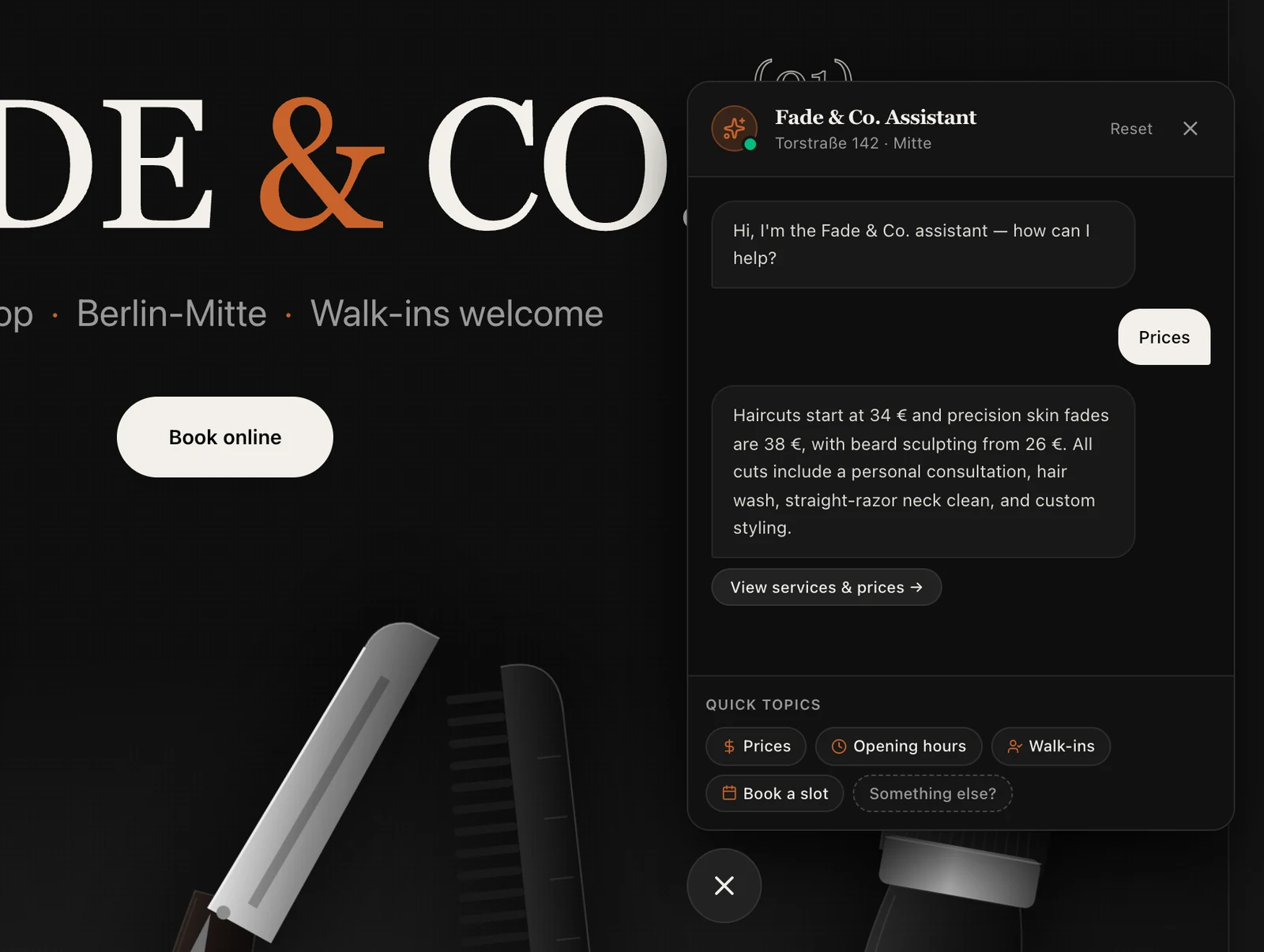
How Firelent chatbots work#
The chatbots you build with Firelent today are guided assistants: they follow the conversation you lay out, with buttons for the most common questions and clear answers for each one. They don't use an AI model to make up answers on the spot.
That's a strength for most businesses:
- Always correct. Every answer is fixed text you can read and change, so it can't invent a price, a discount or a policy.
- Free to run. No usage costs per message, however many visitors chat.
- Predictable. You know exactly what every visitor will see.
What a Firelent chatbot can do#
- Answer common questions — opening hours, prices, parking, how booking works.
- Guide with quick replies — buttons like “Prices”, “Book a slot” or “Talk to a person”.
- Branch the conversation — a different path for new customers, returning customers or businesses.
- Collect leads — ask for a name, an email and what someone needs, and save it automatically.
- Hand over — send people to your booking form, your phone number or your email when they need more.
What it can't do yet: understand any free-form question with AI, answer things outside the conversation you designed, or learn from your documents.
Design the conversation#
A good assistant is designed like a good shop assistant: short, friendly and helpful. Before you prompt:
List the top questions
Write down the ten questions you hear most — from your inbox, your phone and your counter. These become the quick-reply buttons.
Write short answers
Two or three sentences each, with a link to the page that says more.
Decide what to collect
Only ask for what you'll use: usually a name, an email and what someone needs.
Plan the way out
Every path should end somewhere useful: a booking, a contact form, a phone number.
Add a chat assistant to every page of the Fade & Co. website, opening as a small bubble in the bottom right. Greet with “Hi, I'm the Fade & Co. assistant — how can I help?” and quick replies for Prices, Opening hours, Walk-ins and Book a slot. Answer each in two sentences using the information on the site, and link to the right section. Add “Something else?” which asks for a name, an email and a short message, saves it, and says we'll get back within a day. Match the site's dark style.
Collect leads#
When your assistant asks for contact details, each conversation's answers are saved automatically. Find them in your project under Project → Data, where you can browse and export them.
Firelent doesn't email you about new leads yet — check Project → Data regularly, or ask for the assistant to show your phone number for anything urgent.
Good practice#
- Say it's an automated assistant. Visitors trust a bot more when it's clear what it is.
- Keep answers short. Two or three sentences, then a link or a button.
- Always offer a human. A phone number or a contact form, one tap away.
- Don't ask for sensitive information — no health details, ID numbers or payment details in the chat. What your site saves can be read by anyone who uses it.
- Read what people ask. The questions visitors leave in your Data are the best ideas for new quick replies.
Make it better#
- Add a quick reply whenever the same question shows up three times.
- Match the tone of your business — “Hey!” for a café, “Good afternoon” for a law firm.
- Test every path in the preview: click each button and make sure each one ends somewhere useful.
FAQ#
Can my chatbot use ChatGPT or another AI model?#
Not yet. Chatbots built with Firelent follow the conversation you design.
Can the assistant show on every page?#
Yes. Ask for it to appear on every page, and say where it should sit and when it should open.